Car Parking Multiplayer How to Customize Your Car
Introduction
One of the most enjoyable parts of Car Parking Multiplayer is car customization. The game allows players to modify both the appearance and performance of their vehicles, making each car unique. Whether you want a stylish street build, a racing setup, or a realistic daily driver, customization plays a big role in shaping your experience.
This guide explains how to customize your car in Car Parking Multiplayer and make the most of all available options.
Where to Customize Your Car
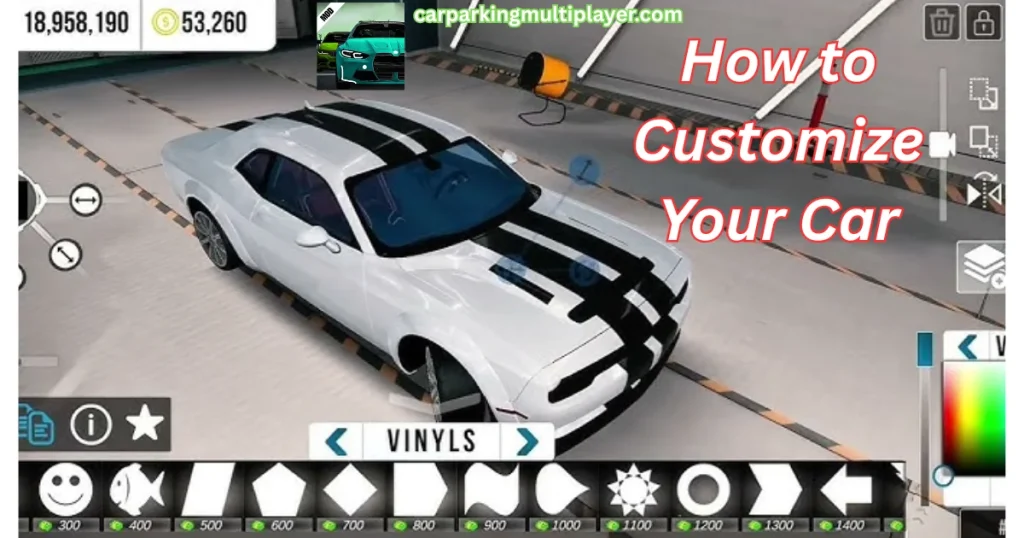
To start customizing your vehicle, you need to access the in game garage or tuning area.
Generally, you can:
- Open the main menu
- Select your garage or car settings
- Choose the vehicle you want to modify
- Enter the customization or tuning section
Once inside, you will see different categories of modifications for both appearance and performance.
Exterior Customization Options
Paint and Colors
You can change the color of your car to match your style. The game often includes:
- Solid colors
- Metallic finishes
- Custom shades
Choosing the right color helps define your car’s personality.
Wheels and Rims
Wheels are one of the most noticeable customization features.
You can:
- Change rim designs
- Select different sizes
- Adjust wheel styles for sport or luxury looks
Wheels can completely transform how your car looks on the road.
Body Kits
Body kits allow you to modify the shape and design of your car.
Options may include:
- Front bumpers
- Rear bumpers
- Side skirts
- Spoilers
These changes give your car a more aggressive or sporty appearance.
Window Tint
Window tinting adds style and privacy to your vehicle. You can choose how dark or light you want your windows to appear.
Stickers and Decals
Some versions of the game allow decals or stickers. These can be used to personalize your car further and create unique designs.
Interior Customization Options
Car Parking Multiplayer also includes interior customization in many vehicles.
You can modify:
- Dashboard style
- Steering wheel design
- Seat colors
- Interior trims
These changes help create a more immersive driving experience, especially in cockpit view.
Performance Upgrades
Performance tuning is important if you want better speed, handling, and control.
Engine Upgrades
Upgrading the engine improves acceleration and top speed.
Suspension Tuning
Suspension settings affect how your car handles bumps, turns, and road conditions.
Brake Improvements
Better brakes help you stop faster and control your car more safely during high speed driving.
Transmission Settings
Adjusting transmission can improve gear shifting and overall performance.
These upgrades are especially useful for racing or high speed driving.
How to Customize Step by Step
Here is a simple step by step process:
- Open the game and go to your garage.
- Select the car you want to customize.
- Enter the customization or tuning menu.
- Choose the category (paint, wheels, performance, etc.).
- Apply changes and preview your car.
- Save your setup before exiting.
Once saved, your customized car will be ready to use in all game modes.
Tips for Better Customization
Choose a Theme
Instead of random changes, try building a theme such as:
- Sport racing style
- Luxury elegant look
- Off road setup
- Street drift build
A consistent theme makes your car look more professional.
Balance Looks and Performance
A good car is not only about appearance. Make sure your upgrades also improve handling and driving ability.
Test Your Setup
After customizing, take your car for a test drive to see how it performs on different roads.
Don’t Rush Upgrades
Start with basic modifications and slowly improve your car as you earn more in game currency.
Common Mistakes to Avoid
Beginners often make these mistakes:
- Spending all money on appearance only
- Ignoring performance upgrades
- Using mismatched parts that don’t suit the car
- Over-upgrading too early without practice
- Not saving custom setups
Avoiding these mistakes will help you build better and more balanced cars.
Why Customization Is Important
Customization is not just about looks. It helps players:
- Express personal style
- Improve driving performance
- Stand out in multiplayer mode
- Create unique vehicle builds
- Enjoy a more immersive experience
This is one of the reasons why Car Parking Multiplayer remains so popular among car enthusiasts.
Conclusion
Car customization in Car Parking Multiplayer gives players complete control over how their vehicles look and perform. From paint colors and body kits to engine upgrades and suspension tuning, there are many ways to build your perfect car.
By experimenting with different styles, balancing performance upgrades, and planning your design carefully, you can create a vehicle that stands out in both single player and multiplayer modes. Whether you prefer stylish designs or high performance builds, customization makes the game more personal and enjoyable.